
HP LaserJet MFP M72625dn Reset Procedure Map

HP LaserJet MFP M72625dn Reset Procedure Map 1️⃣ ➤ On printer [...]
HP LaserJet MFP M72625dn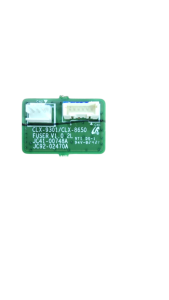
Reset Procedure Map
1️⃣ ➤ On printer press “1 → 2 → 3” quickly in one go
(Single quick sequence — not one by one slowly)
2️⃣ ➤ Printer will ask for password
Enter: 1934
3️⃣ ➤ This will open Service Function Menu
4️⃣ ➤ Go to Part Replacement section
5️⃣ ➤ Inside “Part Replacement” you’ll see options like:
Fixing Unit
Drum Unit
Transfer Unit
etc.
6️⃣ ➤ Select Fixing Unit
7️⃣ ➤ If status is ON, turn OFF
➡️ This resets the fixing counter
8️⃣ ➤ If Error Code 16 still appears continuously →
Replace the Fixing Unit Chip
Share This Article

Written by : admin
Follow Us
Latest Articles

November 2, 2026

November 2, 2026
November 2, 2026


 "Quick Order on WhatsApp"