
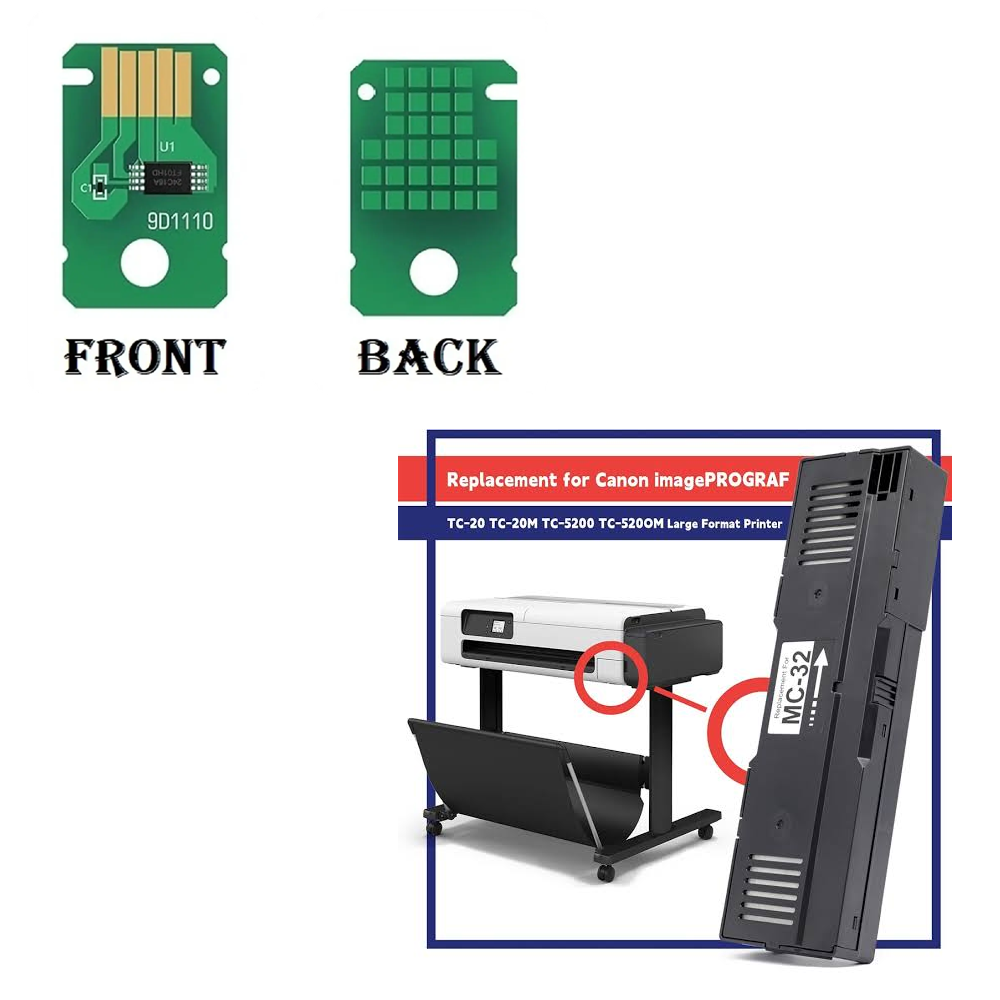
GC Original Maintenance Cartridge Chip (Resetter) for Canon MC-32 – For imagePROGRAF TC-20 / TC-20M / TC-5200 / TC-5200M
₹249.00 (₹293.82 Including Tax)
You save
1 in stock
| Weight | .1 g |
|---|---|
| COMPATIBLE BRAND | Epson |
| PRINTER CATEGORY | INKJET |
| PRODUCT TYPE | IMPORT – NEW |
| Warranty | NO WARRANTY |
1 in stock
Description
🏷️ Product Title
GC Original Maintenance Cartridge Chip (Resetter) for Canon MC-32 – For imagePROGRAF TC-20 / TC-20M / TC-5200 / TC-5200M
⚡ 2-Line SEO Hook
Fix “maintenance cartridge full” and “replace maintenance cartridge” errors with the GC Original Maintenance Cartridge Chip for the Canon MC-32 on the imagePROGRAF TC-20 and TC-5200 series.
Replacement chip that resets the maintenance cartridge so the printer accepts it again.
📝 Product Description
The GC Original Maintenance Cartridge Chip (also called MC-32 chip, waste ink tank chip or maintenance box resetter) is a replacement chip for the Canon MC-32 maintenance cartridge used in the Canon imagePROGRAF TC-20, TC-20M, TC-5200 and TC-5200M large-format printers.
The maintenance cartridge collects waste ink from head cleaning and maintenance. Its chip counts how full the cartridge is, and when the counter reaches the limit, the printer reports that the cartridge is full and stops printing. Fitting a new chip resets the counter, so the printer reads the maintenance cartridge as new.
A full or faulty chip can cause:
- “Maintenance cartridge full” or “Replace maintenance cartridge” with the printer stopping
- “Maintenance cartridge not recognised” errors
- Printer refusing to print or clean until the cartridge is replaced
- Counter staying full after the cartridge has been emptied
- Printer not accepting an emptied and reused maintenance cartridge
Replacing the chip lets the printer accept the maintenance cartridge again.
Important: the chip only resets the counter. Please empty or replace the full maintenance cartridge first, so waste ink does not overflow. This is the chip only, not the cartridge.
Ideal for printer technicians, service centers and dealers.
✅ Features
✔ Chip for Canon MC-32 Maintenance Cartridge
✔ Fixes “Maintenance Cartridge Full” and “Not Recognised” Errors
✔ Resets the Maintenance Counter to New
✔ Fits Canon imagePROGRAF TC-20, TC-20M, TC-5200 and TC-5200M
✔ Trusted GC Original Quality
📌 Compatible Printer Models
- Canon imagePROGRAF TC-20
- Canon imagePROGRAF TC-20M
- Canon imagePROGRAF TC-5200
- Canon imagePROGRAF TC-5200M
Also listed by suppliers: Canon imagePROGRAF TC-21, TC-21M, TC-5210 and TC-5210M.
Compatible Cartridge
Canon MC-32 Maintenance Cartridge
Please check that your printer uses the MC-32 before ordering.
✔ Grouped Model Search
Canon imagePROGRAF TC-20 / TC-20M / TC-5200 / TC-5200M
TC-20 / TC20 / TC-20M / TC-5200 / TC5200 / TC-5200M
Other Names
- Maintenance Cartridge Chip
- MC-32 Chip
- Waste Ink Tank Chip
- Maintenance Box Chip
- Chip Resetter
Compatible Printer Parts
Maintenance Cartridge Chip / MC-32 Chip / Waste Ink Tank Chip
📌 Product Usage / Section
- Maintenance Cartridge Chip
- MC-32 Chip
- Canon Printer Spare Parts
- Large Format Printer Parts
- Waste Ink Tank Parts
- Printer Repair Parts
🔍 Technical Details
- Product Type: Maintenance Cartridge Chip (Resetter)
- Brand: GC Original
- Compatible Cartridge: Canon MC-32
- Compatible Brand: Canon
- Function: Resets the Maintenance Cartridge Counter So the Printer Reads It as New
- Installation: Technician Recommended
✅ WHY BUY THIS PRODUCT
✔ Low-Cost Fix for Maintenance Cartridge Errors
✔ Lets You Keep Using the MC-32 After Servicing
✔ Fits Four imagePROGRAF Models
✔ Trusted GC Original Quality
❓ Frequently Asked Questions (FAQ)
Q1. What does the Maintenance Cartridge Chip do?
It stores how full the maintenance cartridge is. The printer reads it, and a new chip resets the counter so the printer reads the cartridge as new.
Q2. Which printers is it compatible with?
Canon imagePROGRAF TC-20, TC-20M, TC-5200 and TC-5200M. Suppliers also list the TC-21, TC-21M, TC-5210 and TC-5210M.
Q3. Does the chip empty the ink tank?
No. The chip only resets the counter. Please empty or replace the full maintenance cartridge first, so waste ink does not overflow inside the printer.
Q4. Is this the maintenance cartridge?
No. This is the chip only. The MC-32 cartridge is sold separately.
Q5. What problems can a new chip solve?
A new chip can help resolve:
- “Maintenance cartridge full” or “Replace maintenance cartridge” errors
- “Maintenance cartridge not recognised”
- Counter staying full after emptying
- Printer not accepting a reused cartridge
Q6. Is professional installation recommended?
Yes. The chip is small and must be fitted correctly on the cartridge, so a technician is recommended.
⚠️ Common Problems Fixed
- “Maintenance Cartridge Full” / “Replace Maintenance Cartridge”
- “Maintenance Cartridge Not Recognised”
- Printer Refusing to Print or Clean
- Counter Staying Full After the Cartridge Is Emptied
- Reused Cartridge Not Accepted
Canon MC-32 Chip, Canon MC32 Maintenance Cartridge Chip, Canon TC-20 Maintenance Chip, Canon TC-5200 Waste Ink Tank Chip, Canon TC-20M Chip Resetter, Canon TC-5200M Maintenance Box Chip, imagePROGRAF MC-32 Resetter, Buy Canon MC-32 Chip Online, Canon Large Format Printer Parts, Maintenance Chip Price India, GC Original Maintenance Chip, Where To Buy Canon MC-32 Chip, Canon TC-20 Maintenance Cartridge Full Fix, Canon TC-5200 Replace Maintenance Cartridge Fix.
🌐 AI / Conversational Search Answer Block
Q: My Canon imagePROGRAF TC-20 or TC-5200 says “maintenance cartridge full” or won’t recognise the maintenance cartridge. What part could fix this?
A: The MC-32 maintenance cartridge chip has likely reached its limit. Empty or replace the full tank first. A new Maintenance Cartridge Chip (MC-32) resets the counter so the printer reads the cartridge as new on the Canon TC-20, TC-20M, TC-5200 and TC-5200M.
🔎 Quick Search Terms (Customer-Style Short Search)
Chip MC-32, Maintenance Chip TC-20, Maintenance Chip TC-5200, Waste Ink Tank Chip Canon, MC-32 Resetter, Canon Maintenance Cartridge Full Fix, Maintenance Chip Price
📜 Terms & Policy
⚠️ Warranty & Return Policy: As per product description above. Only claims are considered, and only if a valid open-box unboxing video is available, reported within 48 hours of delivery. Return courier charges are to be borne by the buyer, as we quote our counter/pickup rate, not doorstep delivery rate. If the product is found working upon receipt from the customer, both-side courier charges are to be borne by the buyer.
✅ Compatibility: Please verify the exact model of your printer and that it uses the Canon MC-32 maintenance cartridge before ordering. We are not responsible for wrong orders placed due to incorrect model selection by the buyer.
🛠️ Installation: The chip is a small electronic component. We recommend installation by a qualified technician. The chip resets the counter only. Please empty or replace a full maintenance cartridge first. We are not responsible for ink overflow or damage caused by using a full cartridge or by improper installation.
🚫 Non-Returnable: Chips are non-returnable once installed, except under the warranty terms stated above.
💰 Pricing: Prices and stock availability are subject to change without prior notice.
📦 Shipping Damage: Please inspect the package at delivery. Transit damage must be reported with photo/video evidence within 24 hours of delivery.
⚠️ Technical Product Notice: All parts sold here are technical printer components intended for use by technicians or individuals with printer repair knowledge. These are not plug-and-play consumer accessories. If a chip is installed incorrectly, or does not resolve your printer issue due to a misdiagnosis or firmware restrictions (not a defect in the chip itself), it will not qualify for return or refund. We strongly recommend consulting a qualified technician before ordering if you are unsure about installation or compatibility.
You must be logged in to post a review.
Related Products



 "Quick Order on WhatsApp"
Reviews
There are no reviews yet.