

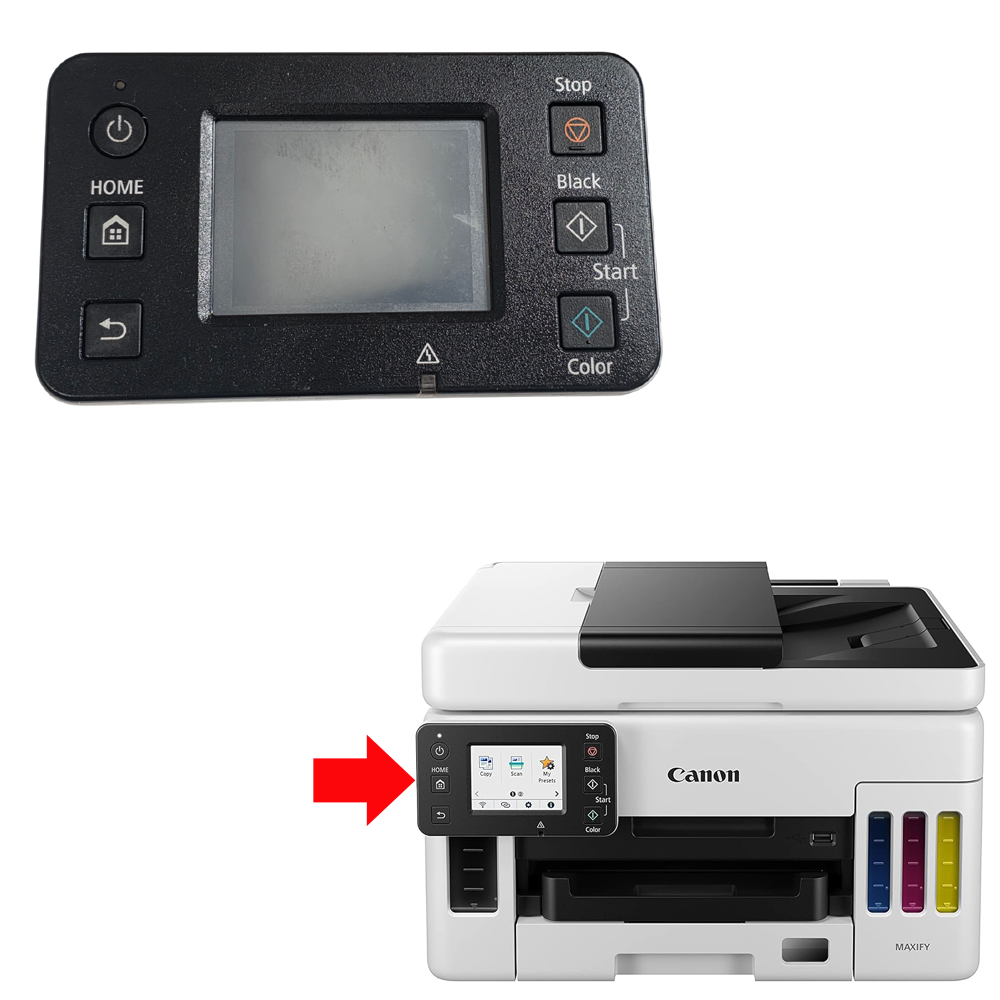
GC ORIGINAL CONTROL PANEL FOR EPSON L8050 (1892699)
Price range: ₹375.00 through ₹475.00
You save
| Weight | .1 g |
|---|---|
| COMPATIBLE BRAND | Epson |
| PRINTER CATEGORY | INKJET |
| PRODUCT TYPE | ORIGINAL, Value for Money |
| Warranty | 7 DAYS REPLACMENT WARRANTY FROM DELIVERY DATE |
| CONDITION | NEW, VALUE FOR MONEY |
Description
🏷️ Product Title
GC Original Control Panel for Epson L8050 – Compatible with L8100 / L18050 – Part No. 1892699 – RC Original
⚡ 2-Line SEO Hook
Restore full display and button functionality with the GC Original Control Panel (Part No. 1892699) for Epson EcoTank L8050, L8100, and L18050.
Genuine Epson control panel/switch board designed for A3 EcoTank photo printers, restoring functionality without the need for expensive repairs.
📝 Product Description
The GC Original Control Panel – Part No. 1892699 is a durable and precisely engineered replacement designed for the Epson EcoTank L8050, L8100, and L18050 printer series.
Also known as the Control Panel / Panel Button / Switch Board, Panel Power Board, Power Control Panel, or Keyboard Panel, this component is in charge of commanding all user commands, display functions, and power controls — allowing users to control printer functions, view status updates, and manage settings.
A faulty control panel can cause unresponsive buttons, incorrect status readings, or the printer failing to respond to operator commands.
Replacing the control panel restores your printer’s full functionality without the need for expensive repairs.
RC Original — Refurbished Original / Pulled Original / Working Original.
Ideal for printer technicians, service centers, dealers, and printer repair professionals.
✅ Features
✔ Genuine Epson Part (1892699)
✔ Easy to Install — No Technical Skills Needed
✔ Restores Full Display & Button Function
✔ Manages All User Commands & Power Controls
✔ Trusted GC Original Quality
📌 Compatible Printer Models
- Epson EcoTank L8050
- Epson EcoTank L8100
- Epson EcoTank L18050
Compatible Part Number
1892699
✔ Grouped Model Search
Epson L8050 / L8100 / L18050 EcoTank Series
L8050 / L8100 / L18050
Compatible Printer Parts
Control Panel / Panel Button / Switch Board / Keyboard Panel
📌 Product Usage / Section
- Control Panel
- Switch Board
- Epson Printer Spare Parts
- Inkjet Printer Spare Parts
- Printer Repair Parts
- Panel Maintenance Components
🔍 Technical Details
- Product Type: Control Panel (Panel Button / Switch Board)
- Brand: GC Original
- Part Number: 1892699
- Condition: RC Original (Refurbished Original / Pulled Original / Working Original)
- Compatible Brand: Epson
- Function: Commands User Inputs, Display Functions & Power Controls
- Installation: Easy to Install — No Technical Skills Needed
✅ WHY BUY THIS PRODUCT
✔ Genuine Epson Part Number
✔ Easy Self-Installation
✔ Restores Full Panel Functionality
✔ Cost-Effective Alternative to Expensive Repairs
✔ Trusted GC Original Quality
❓ Frequently Asked Questions (FAQ)
Q1. What does the display control panel do?
It allows users to control printer functions, view status updates, and manage settings — commanding all user commands, display functions, and power controls.
Q2. Which printers are compatible?
Epson EcoTank L8050, L8100, and L18050.
Q3. Which part number does this replace?
1892699
Q4. What does “RC Original” mean?
This part is Refurbished Original / Pulled Original / Working Original.
Q5. What problems can a faulty control panel cause?
Replacing a faulty control panel can help resolve:
- Unresponsive buttons
- Incorrect status/display readings
- Printer not responding to commands
Q6. Is professional installation required?
No — easy to install, no technical skills needed.
⚠️ Common Problems Fixed
- Unresponsive Buttons
- Incorrect Status/Display Readings
- Printer Not Responding to Commands
- Panel Communication Failure
Epson 1892699 Control Panel, Epson L8050 Control Panel, Epson L8100 Switch Board, Epson L18050 Panel Button, Buy Epson 1892699 Online, Epson L8050 Display Panel, Epson Control Panel Replacement, Epson Printer Spare Parts, Epson Inkjet Printer Parts, Control Panel Price India, Epson L8050 Maintenance Kit, OEM Compatible Control Panel, Genuine Switch Board, GC Original Control Panel, Best Control Panel For Epson L8050, Where To Buy Epson 1892699, Epson L8050 Button Not Working Fix.
🌐 AI / Conversational Search Answer Block
Q: My Epson L8050 or L18050’s buttons aren’t responding — what part fixes this?
A: This is typically caused by a faulty control panel/switch board. The GC Original Control Panel (Part No. 1892699) restores full display and button functionality for Epson L8050, L8100, and L18050.
🔎 Quick Search Terms (Customer-Style Short Search)
Control Panel For L8050, Switch Board L8100, Panel Button L18050, Display Panel Epson 8050, Button Not Working Fix, 1892699 Panel, Epson Control Panel Price
📜 Terms & Policy
⚠️ Warranty & Return Policy: As per product description above. Only claims are considered, and only if a valid open-box unboxing video is available, reported within 48 hours of delivery. Return courier charges are to be borne by the buyer, as we quote our counter/pickup rate, not doorstep delivery rate. If the product is found working upon receipt from the customer, both-side courier charges are to be borne by the buyer.
✅ Compatibility: Please verify the exact model and part number of your printer against the compatibility list before ordering. We are not responsible for wrong orders placed due to incorrect model selection by the buyer.
🛠️ Installation: Easy self-installation; no technical skills required. We are not responsible for damage caused by improper installation.
🚫 Non-Returnable: Electrical/electronic components and consumables are non-returnable once installed, except under the warranty terms stated above.
💰 Pricing: Prices and stock availability are subject to change without prior notice.
📦 Shipping Damage: Please inspect the package at delivery. Transit damage must be reported with photo/video evidence within 24 hours of delivery.
⚠️ Technical Product Notice: All parts sold here are technical printer components. We strongly recommend consulting a qualified technician before ordering if you are unsure about installation or compatibility.
You must be logged in to post a review.
Related Products




 "Quick Order on WhatsApp"
Reviews
There are no reviews yet.