
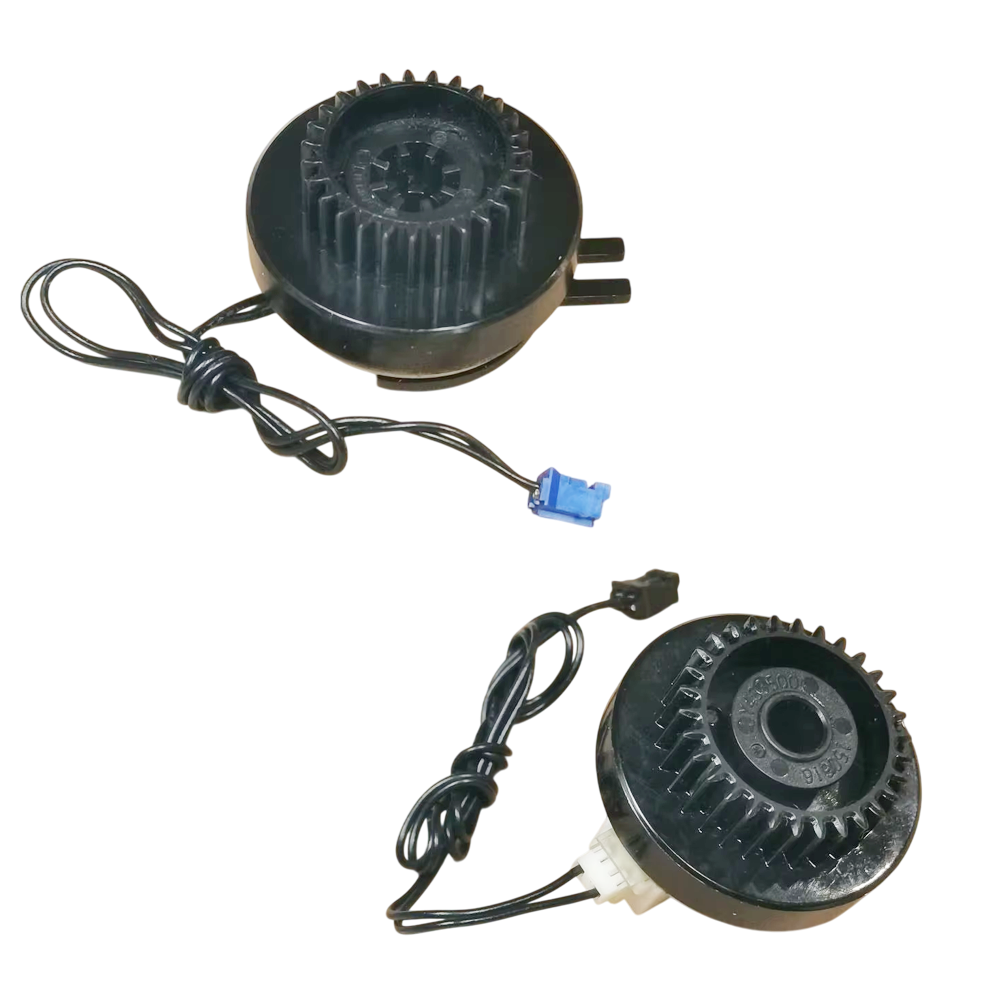
Pickup Clutch + Registration Clutch Set for Brother DCP-L5650DN / HL-L5200DW / HL-L6400DW / MFC-L5900DW / MFC-L6900DW and More – Part No. LY4332001 / LY4335001 (Set)
₹649.00 (₹765.82 Including Tax)
You save
1 in stock
| PRINTER CATEGORY | LASERJET |
|---|---|
| PRODUCT TYPE | ORIGINAL |
| Warranty | NO WARRANTY |
| COMPATIBLE BRAND | Brother |
1 in stock
Description
🏷️ Product Title
Pickup Clutch + Registration Clutch Set for Brother DCP-L5650DN / HL-L5200DW / HL-L6400DW / MFC-L5900DW / MFC-L6900DW and More – Part No. LY4332001 / LY4335001 (Set)
⚡ 2-Line SEO Hook
Fix paper not picking up, double feeding and registration jams with the Pickup Clutch and Registration Clutch Set (LY4335001 + LY4332001) for Brother mono laser printers and multifunction machines.
Two-clutch set that controls paper pickup from the tray and timing at the registration point.
📝 Product Description
The Pickup Clutch + Registration Clutch Set – Part No. LY4335001 and LY4332001 is a replacement set of paper-feed clutches for Brother HL, DCP and MFC mono laser printers in the HL-5440 / HL-L5000 / HL-L6000 and MFC-L5700 / L6900 families.
The set contains two clutches:
- LY4335001, T1 Pickup Clutch: starts and stops the pickup roller, so paper is drawn from the tray one sheet at a time.
- LY4332001, Registration Clutch: starts and stops the registration roller, so each page is lined up and sent into the print path at the right moment.
A worn or failing clutch can cause:
- Paper not picking up from the tray
- Paper jams at the start of the paper path or at registration
- Double feeds or skewed pages
- Clicking, slipping or grinding as paper starts to feed
- “No paper” or “Jam Tray” errors with paper loaded
Replacing the clutches restores smooth paper pickup and timing.
Ideal for printer technicians, service centers and dealers.
✅ Features
✔ Two-Clutch Set: Pickup Clutch (LY4335001) + Registration Clutch (LY4332001)
✔ Fixes Paper Not Picking Up and Registration Jams
✔ Restores Correct Feed Timing
✔ Wide Brother HL, DCP and MFC Compatibility
✔ Trusted Quality
📌 Compatible Printer Models
Brother DCP Series
- DCP-8110DN, DCP-8150DN, DCP-8155DN
- DCP-L5500DN, DCP-L5600DN, DCP-L5650DN
Brother HL Series
- HL-5440D, HL-5450DN, HL-5470DW, HL-5470DWT
- HL-6180DW, HL-6180DWT
- HL-L5000D, HL-L5100DN
- HL-L5200DW, HL-L5200DWT
- HL-L6200DW, HL-L6200DWT, HL-L6250DW, HL-L6300DW
- HL-L6400DW, HL-L6400DWT
Brother MFC Series
- MFC-8510DN, MFC-8710DW, MFC-8910DW, MFC-8950DW, MFC-8950DWT
- MFC-L5700DW, MFC-L5800DW, MFC-L5850DW, MFC-L5900DW
- MFC-L6700DW, MFC-L6750DW, MFC-L6800DW, MFC-L6900DW
Compatible Part Numbers
LY4335001 (T1 Pickup Clutch) + LY4332001 (Registration Clutch)
Verify before ordering: HL-L5210DN / DW and DCP-L5510DN. These newer models are not confirmed for this set. Please check your exact model and part numbers.
✔ Grouped Model Search
Brother DCP-L5650 / HL-L5100 / HL-L5200 / HL-L6200 / HL-L6400 / MFC-L5700 / MFC-L5800 / MFC-L6900 / HL-5440 / HL-5470 / HL-6180 / MFC-8510 / MFC-8950
DCP-L5650DN / HL-L5100DN / HL-L5200DW / HL-L6200DW / HL-L6400DW / MFC-L5700DW / MFC-L5900DW / MFC-L6900DW / HL-5470DW / HL-6180DW / MFC-8510DN
Other Names
- Pickup Clutch
- T1 Pickup Clutch
- Paper Feed Clutch
- Registration Clutch
- Clutch Set
Compatible Printer Parts
Pickup Clutch / Paper Feed Clutch / Registration Clutch / Clutch Set
📌 Product Usage / Section
- Pickup Clutch
- Registration Clutch
- Brother Printer Spare Parts
- Laser Printer Spare Parts
- Printer Repair Parts
- Paper Feed Components
🔍 Technical Details
- Product Type: Clutch Set (Pickup Clutch + Registration Clutch)
- Part Numbers: LY4335001 (T1 Pickup Clutch) + LY4332001 (Registration Clutch)
- Quantity: 1 Set (2 Clutches)
- Compatible Brand: Brother
- Function: Controls Paper Pickup From the Tray and Registration Timing
- Installation: Technician Recommended
✅ WHY BUY THIS PRODUCT
✔ Complete Two-Clutch Set
✔ Fixes Pickup and Registration Faults
✔ Fits Many Brother Mono Laser Models
✔ Low-Cost Mechanical Repair
❓ Frequently Asked Questions (FAQ)
Q1. What is in the set?
Two clutches: the T1 Pickup Clutch (LY4335001) and the Registration Clutch (LY4332001).
Q2. What do the clutches do?
The pickup clutch starts the pickup roller so paper is drawn from the tray. The registration clutch starts the registration roller so each page is lined up and sent into the print path on time.
Q3. Which printers are compatible?
Brother DCP-L5500DN / L5600DN / L5650DN, HL-L5000D / L5100DN / L5200DW / L6200DW / L6300DW / L6400DW, MFC-L5700DW to L6900DW and older HL-5440 / HL-5470 / HL-6180 and MFC-8510 / 8950 models. See the full list above.
Q4. Does it fit the HL-L5210DN or DCP-L5510DN?
Not confirmed for this set. Please verify your exact model before ordering.
Q5. What problems can failing clutches cause?
Replacing worn clutches can help resolve:
- Paper not picking up from the tray
- Jams at registration
- Double feeds or skewed pages
- Clicking or slipping noise
- “No paper” errors with paper loaded
Q6. Is professional installation recommended?
Yes. The clutches sit in the drive frame and need careful removal and correct seating.
⚠️ Common Problems Fixed
- Paper Not Picking Up From the Tray
- Jam at Registration / Start of Paper Path
- Double Feeds or Skewed Pages
- Clicking or Slipping at Paper Start
- “No Paper” / “Jam Tray” Error With Paper Loaded
Brother LY4332001 Registration Clutch, Brother LY4335001 Pickup Clutch, Brother T1 Pickup Clutch, Brother Paper Feed Clutch Set, Brother DCP-L5650DN Pickup Clutch, Brother HL-L5200DW Clutch, Brother HL-L6400DW Pickup Clutch, Brother MFC-L5900DW Registration Clutch, Brother MFC-L6900DW Clutch, Brother HL-5470DW Clutch, Brother HL-6180DW Clutch, Buy Brother Pickup Clutch Online, Brother Laser Printer Parts, Clutch Set Price India, Where To Buy Brother LY4335001, Brother Paper Not Picking Up Fix, Brother Registration Jam Fix.
🌐 AI / Conversational Search Answer Block
Q: My Brother HL-L6400DW, DCP-L5650DN or MFC-L5900DW won’t pick up paper or jams at the start of the paper path. What part could fix this?
A: Worn paper-feed clutches can cause this. The Pickup Clutch + Registration Clutch Set (LY4335001 + LY4332001) restores paper pickup and registration timing for these Brother mono laser printers and multifunction machines.
🔎 Quick Search Terms (Customer-Style Short Search)
Pickup Clutch Brother, Registration Clutch LY4332001, Pickup Clutch LY4335001, Clutch Set DCP-L5650DN, Clutch HL-L6400DW, Clutch MFC-L5900DW, Brother Paper Not Picking Up Fix, Clutch Set Price
📜 Terms & Policy
⚠️ Warranty & Return Policy: As per product description above. Only claims are considered, and only if a valid open-box unboxing video is available, reported within 48 hours of delivery. Return courier charges are to be borne by the buyer, as we quote our counter/pickup rate, not doorstep delivery rate. If the product is found working upon receipt from the customer, both-side courier charges are to be borne by the buyer.
✅ Compatibility: Please verify the exact model and part numbers of your printer against the compatibility list before ordering. We are not responsible for wrong orders placed due to incorrect model selection by the buyer.
🛠️ Installation: These are precision mechanical parts. We recommend installation by a qualified technician. We are not responsible for damage caused by improper installation.
🚫 Non-Returnable: Mechanical and electrical components are non-returnable once installed, except under the warranty terms stated above.
💰 Pricing: Prices and stock availability are subject to change without prior notice.
📦 Shipping Damage: Please inspect the package at delivery. Transit damage must be reported with photo/video evidence within 24 hours of delivery.
⚠️ Technical Product Notice: All parts sold here are technical printer components intended for use by technicians or individuals with printer repair knowledge. These are not plug-and-play consumer accessories. If a part is installed incorrectly or does not resolve your printer issue due to a misdiagnosis (not a defect in the part itself), it will not qualify for return or refund. We strongly recommend consulting a qualified technician before ordering if you are unsure about installation or compatibility.
You must be logged in to post a review.
Related Products





 "Quick Order on WhatsApp"
Reviews
There are no reviews yet.